


PayByPhone
4.810.06K Reviews
App Specs
- Version
- 26.7.1
- Updated On
- License
- Free
- Downloads
- 10,000,000+
- Developer
- PayByPhone Technologies Inc .
- Categories
- Auto & Vehicles
- Platform
- Android, iOS
Screenshots

 Analysis by AppCompare
I find PayByPhone most useful when parking is the small but stressful first task of an outing: locate a space, work out the rules, pay, then get on with the day. Its appeal is practical rather than flashy. It is a free parking app from PayByPhone Technologies Inc., and the central idea is to handle payment on a phone instead of at a meter. That can save a few minutes when I’m carrying bags, trying to keep up with passengers, or standing in bad weather.
A useful shortcut, with a local catch
The key question before relying on it is whether the particular space accepts PayByPhone. The app is not a universal parking pass: a payment workflow only helps where the relevant parking area supports it. I’d check the signs at the space first, then use the location code printed there rather than assuming the nearest option shown on a map is the right one. A location can look close on a screen while belonging to a different parking zone, and entering the wrong code is an avoidable way to create confusion.
That makes the app a better fit for people who park in supported areas regularly, especially when they already know where to look for the code. For an occasional visitor, it is still straightforward, but the meter or other payment method remains a sensible backup if the signs point to a different system. I would not drive somewhere solely on the assumption that this app will cover every lot or street.
Paying without losing track of the session
Once the correct location is selected, the useful habit is to pause before confirming and check the zone, vehicle, and duration. That quick review matters more than tapping quickly: the app can make payment easier, but it cannot decide how long you are allowed to stay or interpret every local restriction for you. I treat the posted rules as the authority and the app as the payment tool.
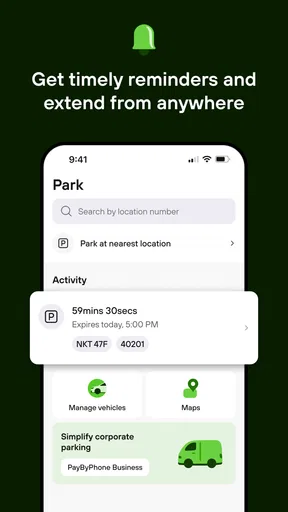
Notifications about an approaching end time are handy, but I wouldn’t treat them as permission to overstay. If an extension is available for that space, it can save a walk back to the meter; if the local limit has been reached, a reminder does not change that rule. I also keep an eye on the session when plans shift, since a phone alert is most useful when notifications are enabled and I can actually see or hear them.
Who gets the most from it
PayByPhone makes the most sense for commuters, shoppers, and people visiting busy districts where finding coins or reaching a machine is inconvenient. It is also useful when someone else is waiting in the car or when I want to get away from the curb promptly. A driver who parks only in places that require a different payment method may have little reason to install it, while someone who prefers cash or avoids storing payment details may be more comfortable using the meter.
Compared with a conventional parking machine, the app can reduce the stop-and-start routine of walking to the machine, paying, and returning to the car. Compared with a general map app, it is aimed at completing the parking payment rather than simply helping me find an address. Neither comparison makes it a replacement for checking signs, restrictions, or the actual availability of a space. Its strength is narrower: it can make the payment step less of a chore when the location is covered.
Worth Reading Before You Choose

Baby Panda World Brings Quick Play to Modern Phones, but Its Game Library Feels Busy

ESPN’s Live Game View Makes Following Close Games Easier

QuizzLand Review: A Good Fit for Short Trivia Breaks, Not Every Player

Basketball Stars: Multiplayer Is Fast, but Can It Recover When Matches Go Wrong?

WEBTOON Turns Phone Updates Into a Better Reading Routine

Link to Windows Runs on Shared Habits, Not Social Feeds
Ever been in that awkward situation where you’re scrambling for change to feed a parking meter? Yeah, me too. Enter PayByPhone, a nifty app that promises to make parking a breeze. I decided to give it a whirl and see if it lives up to the hype.
Getting Started with PayByPhone
First things first, downloading the app was a cinch. It’s available for both Android and iOS, so no worries there. Once installed, setting up an account was straightforward. All you need is your vehicle’s registration and payment details. Boom, you’re in!
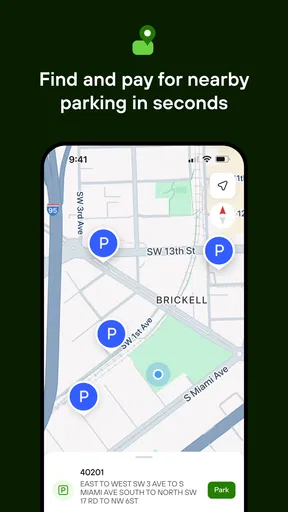
The PayByPhone interface is clean and user-friendly, which is a blessing for those of us who aren’t tech-savvy. The app uses your location to find nearby parking spots. It’s like having a personal parking assistant in your pocket. How cool is that?
How It Works
Using the app is pretty intuitive. You enter the location code displayed on the parking meter, select how long you need to park, and confirm the payment. It’s really as simple as that. No more fishing for coins or dealing with confusing parking machines. Plus, you get a notification when your time is about to expire, so you can extend your parking session without breaking a sweat.
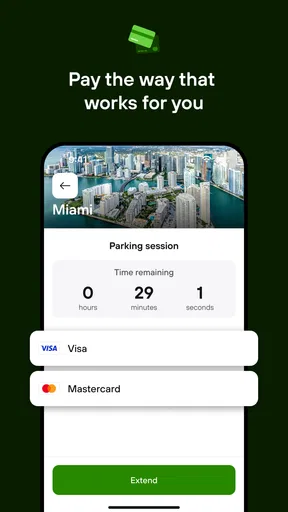
One thing that stood out to me was the availability of multiple payment options. Whether you’re a credit card person or prefer using Apple Pay or Google Pay, PayByPhone has you covered. This flexibility is a major plus in my book.
Real-Life Test
I decided to test the app on a busy afternoon. I drove to a popular shopping area notorious for its parking chaos. Finding a spot was surprisingly easy with the app guiding me. And paying? A breeze. I was in and out of the car in minutes, leaving me more time to shop (or sip coffee, let’s be real).
Throughout my use, I appreciated the app’s reliability. It didn’t crash or lag, even when I was in a heavily populated area. It reassured me that I wouldn’t suddenly find myself with a parking ticket due to a technical glitch.
The Wrap-Up
So, what’s the verdict? PayByPhone delivers on its promise to simplify parking. It’s convenient, easy to use, and saves you the hassle of dealing with parking meters. While I didn’t encounter any major issues, it’s worth noting that availability can vary depending on your location. But if you’re in an area where it’s supported, it’s a total game-changer.
Whether you’re a frequent city parker or just need a reliable option for occasional trips, this app is worth checking out. Say goodbye to parking woes and hello to more seamless adventures!
What the current release tells me
PayByPhone has been available since July 6, 2011, and version 25.9.3 is the current release. That long-running presence suggests a mature service rather than a brand-new experiment, but I wouldn’t infer a particular feature change from a version number alone. The practical test for an existing user is still whether the current app handles the places and payment routine they rely on.
The app has an average rating of 4.9 from around 119,000 ratings, with about 9,600 written reviews and over 10 million installs. Those figures indicate that many people have tried it and that the overall response is strongly positive; they don’t guarantee that every parking authority, street, or individual session will work the same way. I’d read broad popularity as reassurance about familiarity, not as a substitute for checking local signs.
Small habits that prevent avoidable trouble
For a first visit to a new area, I’d open the app while safely parked, compare its location details with the sign, and only then start the session. That is less hurried than trying to decipher a code while traffic is waiting behind me. I’d also confirm that the selected vehicle is the one I arrived in, particularly if more than one registration is saved; a correct payment attached to the wrong vehicle can still leave an unpleasant problem to sort out.
For a quick errand, choosing a realistic duration is better than automatically paying for the maximum. If plans change, the end-time alert can prompt me to check whether I can extend, but I would make that decision before the session expires and only within the posted rules. On the other hand, when I know I’ll be away from my phone or in a place with poor reception, paying at the meter may be the calmer option. Digital convenience depends on being able to complete and keep track of the session.
A realistic example: I arrive near a shop for a short pickup, find a space with a PayByPhone code, and enter the code from the sign rather than relying only on location detection. I check the vehicle and time, pay, then head inside. If the pickup takes longer, I use the reminder as a cue to review the session, not as a promise that I can stay indefinitely. That workflow is where the app earns its place: it reduces the walk back to a machine while leaving the parking rules in my hands.
Where I’d be cautious
There are still moments when the old-fashioned option is more dependable. If a phone battery is nearly empty, mobile service is unreliable, the signage is hard to read, or the area uses another payment provider, I would use the available machine or follow the local instructions instead. The app also asks for vehicle and payment details during setup, so drivers who don’t want those details associated with an account may prefer a pay-at-meter routine.
It is worth separating parking discovery from parking certainty. A location-aware view can help orient me, but it cannot promise a space will be open when I arrive, and finding an apparent match does not remove the need to read restrictions on the curb. I’d also avoid starting a session while driving: pull over or finish parking first, then enter the code carefully. Those are small points, but they matter more than shaving a few taps off the process.
For the audience it serves, the age rating is Everyone, and the app remains free to download. Its high average rating and broad install base make it an easy option to consider, but my recommendation is conditional: use it when the place explicitly supports it and you’re comfortable managing payment on your phone. If you mostly park in facilities with their own machines or prefer not to rely on a phone, a conventional payment method is a better match.
My take after weighing the trade-offs
I’d keep PayByPhone installed if I often park in areas where its location codes are posted. The strongest benefit is not that it changes parking itself; it removes some friction from paying and can help me keep track of a session without returning to the meter. The main trade-off is dependence on local coverage and a working phone, so I still treat signs and backup payment options as part of the plan.
Overall, I recommend it to city drivers who want a simpler way to pay in supported zones and are happy to double-check the details before confirming. I’d tell a friend to try it for a familiar parking area first, learn the code-and-duration flow, and then decide whether it suits their regular routes. It is a handy tool when the conditions are right, not a replacement for attention to the rules of the space.
Pros
- User-friendly interface simplifies transactions.
- Quick payment process saves time.
- Secure transactions with encryption.
- Notifications help avoid parking tickets.
- Wide availability in numerous cities.
Cons
- Limited offline functionality.
- Occasional app crashes reported.
- May incur service fees in some areas.
- GPS inaccuracies can cause issues.
- Requires a stable internet connection.
FAQs for PayByPhone
What is PayByPhone and how does it work?
PayByPhone is a mobile payment app designed for parking. It allows users to pay for parking from their smartphones without needing coins or credit cards. Simply enter the parking location number, select the duration, and confirm payment. Users also receive notifications when their time is about to expire, allowing them to extend parking remotely.
Is my payment information secure with PayByPhone?
Yes, PayByPhone uses advanced security measures to protect your payment information. The app employs encryption and secure servers to ensure that your credit card details and personal information remain confidential and safe from unauthorized access. Additionally, the app does not store your payment information on your device.
Can I use PayByPhone in multiple locations?
Absolutely. PayByPhone operates in various cities worldwide, and you can use the app wherever it is supported. Simply enter the location code for the area you are parking in. Be sure to check the app’s coverage in your city or destination beforehand to ensure availability.
What if I need to cancel my parking session?
If you need to cancel a parking session, you can do so directly through the app before the session starts. However, once a session is active, you may not be able to cancel it, depending on local regulations. Always check the specific terms and conditions for cancellations in the area you are parking.
Are there any additional fees for using PayByPhone?
PayByPhone may charge a small convenience fee on top of your parking fee, which varies by location. This fee helps cover the cost of the service, and details are provided during the payment process. Always review the total amount before confirming your payment to avoid any surprises.


